SiteLens
Inspection checklists that float where the work is.
- My part
- UX design and research
- When
- 5 weeks
- Built on
- iOS, Android and MentraOS AR glasses

SiteLens AR
Goals
- Streamline inspection flows
- Improve data and accuracy
- Reduce costs and increase efficiency
- Enhance collaboration and compliance
- Future-proof AI + AR
Process
- 01
I audited inspection tools and interviewed inspectors, managers, and trade engineers, identifying role-specific checklists, visual comparisons, and cost verification.
Tap to flipFull notes for Research & Discovery:
- Conducted competitive audits of existing construction inspection apps and AR-enabled field tools.
- Interviewed inspectors, project managers, and engineers across trades to uncover pain points in workflows, checklists, and reporting.
- Identified high-need use cases: role-specific inspection checklists, before/after comparisons, and cost verification workflows.
- 02
I reviewed research on construction AR and wearables, focusing on data compliance, legal notifications, and real-time collaboration requirements.
Tap to flipFull notes for Literature Review:
- Reviewed academic and industry sources on AR in construction, wearable-assisted inspections, and spatial computing.
- Explored challenges in data compliance, law/recall notifications, and construction order finalization.
- Identified trust, accuracy, and real-time collaboration as essential UX considerations, beyond hardware specs.
- Used findings to inform principles for checklist design, visual layering, and mobile–AR integration.
- 03
I interviewed field stakeholders to capture tool requirements and design room-based inspection checklists, tailored dashboards, and contractor workflows.
Tap to flipFull notes for Stakeholder Interviews:
Conducted interviews to gather insights from users and stakeholders (implied by mention of stakeholder interviews).
- Used insights to shape inspection templates, room-based checklists, and tailored dashboards.
- Captured requirements for role-specific “ingredient lists” (e.g., scanner, notes, tape measure).
- Helped refine the goals of cost reduction, accuracy, and real-time updates across multiple contractors.
- 04
I tested AR prototypes with field users to measure time saved over paper workflows and improve voice commands and readability.
Tap to flipFull notes for Usability Evaluations:
Tested prototypes with users to assess emotional support, clarity, and personalization.
- Gathered feedback on AR checklist readability, voice/gesture commands, and navigation triggers.
- Measured efficiency: time saved compared to manual inspections and paper-based workflows.
- Used findings to refine visual hierarchy, session summaries, and integration with maps + reminders.
- 05
I built prototypes for mobile and Even Realities G1 glasses, testing room-wise task overlays, photo attachments, and verification prompts.
Tap to flipFull notes for Design & Prototyping:
- Developed low- and high-fidelity prototypes for mobile and AR glasses.
- Designed a modular UI system for uploading inspection checklists, attaching before/after photos, and role-based task lists.
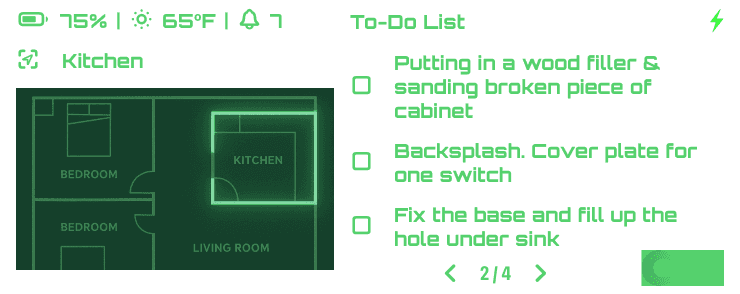
- Prototyped AR overlays including:Room-wise task listsVideo-assisted inspection referencesLaw/recall notificationsCost/order verification prompts
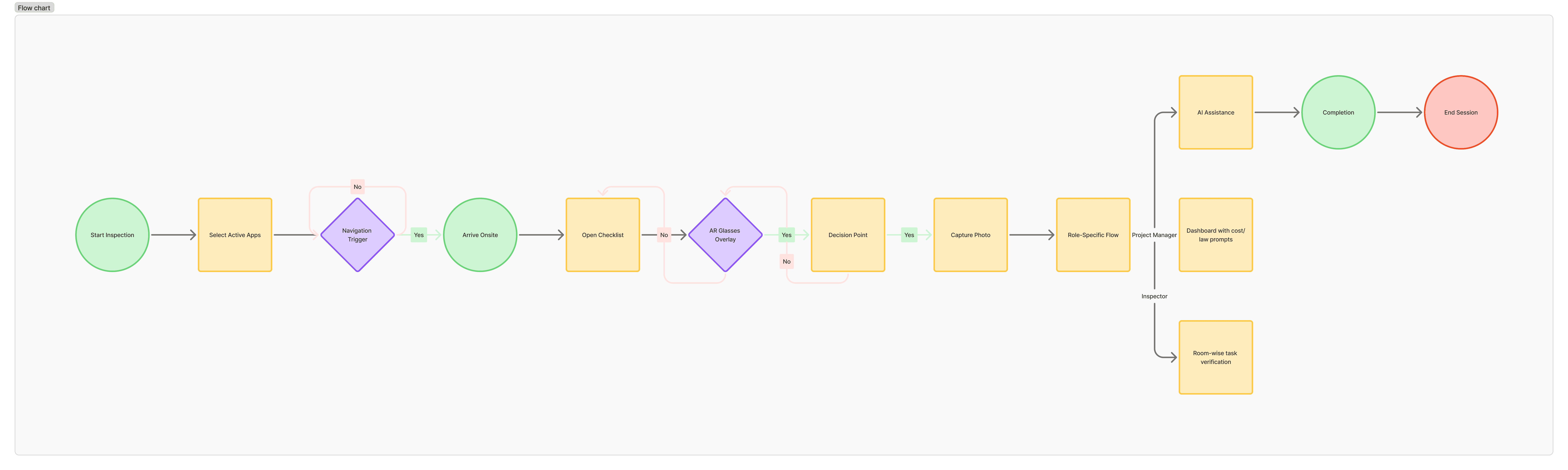
- Created interactive flows simulating site inspections with Even Realities G1 glasses.
- Iterated prototypes with stakeholders for validation and alignment with real-world workflows.
Show full notes
01Research & Discovery
- Conducted competitive audits of existing construction inspection apps and AR-enabled field tools.
- Interviewed inspectors, project managers, and engineers across trades to uncover pain points in workflows, checklists, and reporting.
- Identified high-need use cases: role-specific inspection checklists, before/after comparisons, and cost verification workflows.
02Literature Review
- Reviewed academic and industry sources on AR in construction, wearable-assisted inspections, and spatial computing.
- Explored challenges in data compliance, law/recall notifications, and construction order finalization.
- Identified trust, accuracy, and real-time collaboration as essential UX considerations, beyond hardware specs.
- Used findings to inform principles for checklist design, visual layering, and mobile–AR integration.
03Stakeholder Interviews
Conducted interviews to gather insights from users and stakeholders (implied by mention of stakeholder interviews).
- Used insights to shape inspection templates, room-based checklists, and tailored dashboards.
- Captured requirements for role-specific “ingredient lists” (e.g., scanner, notes, tape measure).
- Helped refine the goals of cost reduction, accuracy, and real-time updates across multiple contractors.
04Usability Evaluations
Tested prototypes with users to assess emotional support, clarity, and personalization.
- Gathered feedback on AR checklist readability, voice/gesture commands, and navigation triggers.
- Measured efficiency: time saved compared to manual inspections and paper-based workflows.
- Used findings to refine visual hierarchy, session summaries, and integration with maps + reminders.
05Design & Prototyping
- Developed low- and high-fidelity prototypes for mobile and AR glasses.
- Designed a modular UI system for uploading inspection checklists, attaching before/after photos, and role-based task lists.
- Prototyped AR overlays including:Room-wise task listsVideo-assisted inspection referencesLaw/recall notificationsCost/order verification prompts
- Created interactive flows simulating site inspections with Even Realities G1 glasses.
- Iterated prototypes with stakeholders for validation and alignment with real-world workflows.
Home Screen
Features
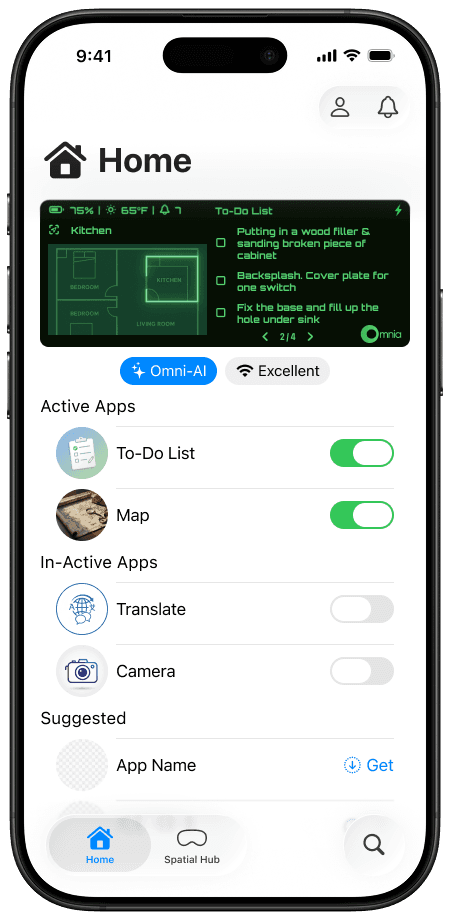
- Dashboard Banner: Displays AR-driven task information (to-do list, floor plan, live inspection data).
- AI Status Module (Omni-AI, Excellent): Real-time system feedback on inspection/AI status.
- Active Apps Section: Toggle control for apps in use (To-Do List, Map).
- Inactive Apps Section: Secondary options (Translate, Camera) to activate as needed.
- Suggested Apps: Personalized extension discovery with one-tap install (App Store style).
- Top Navigation: User/account access via profile + notifications.
Home Screen
Instant Clarity + Ease of Use
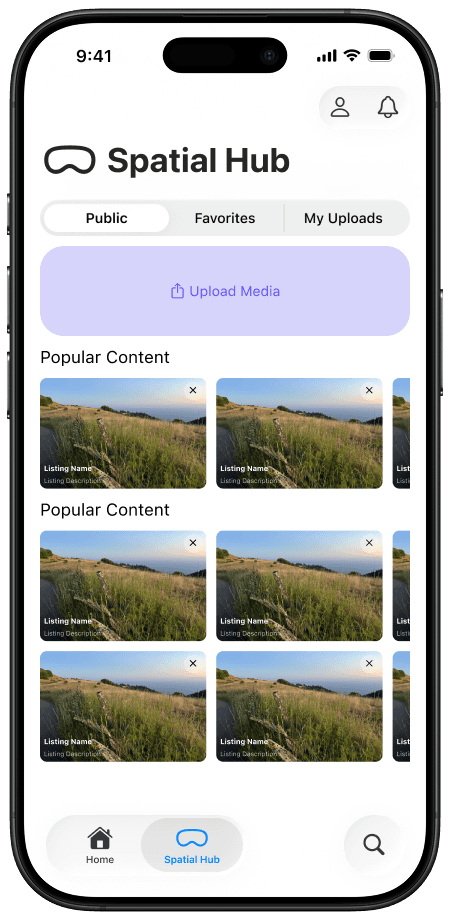
- Content-centric: Prioritizes large thumbnails so users can browse visually, reducing cognitive load.
- Simplicity + Familiarity: Mirrors social apps (Instagram Explore, YouTube library), making it intuitive.
- Scalable: Grid layout supports expansion to more media types (photos, 360 images, AR models).
- Contribution-first: The purple upload CTA signals active participation, not just passive browsing.